

A class is a user-defined template for creating objects.
It bundles data and functions together, making it easier to manage and use them. When we create a new class, we define a new type of object. We can then create multiple instances of this object type.
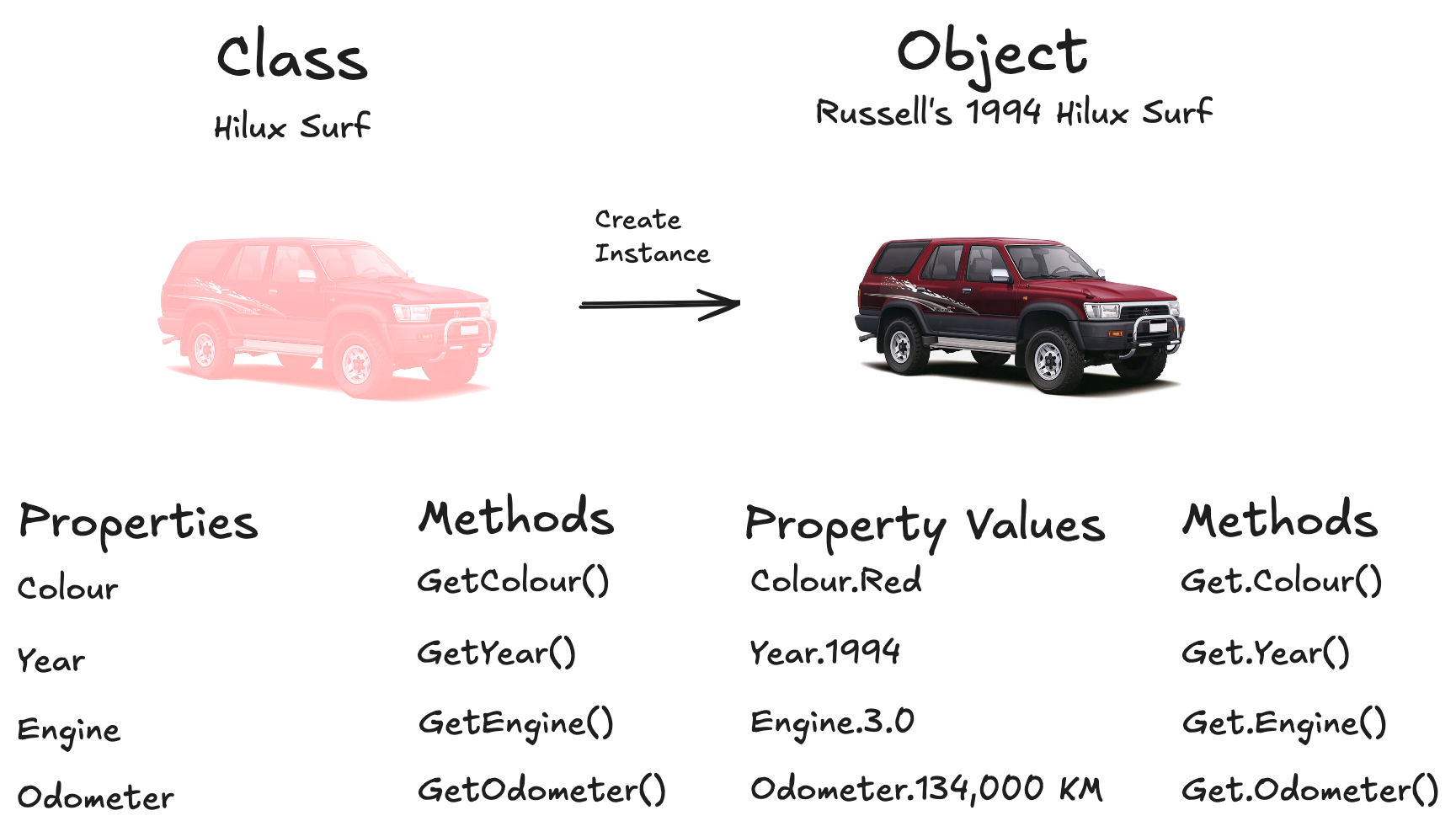
For example, we could create a class representing a 1994 Toyota Hilux Surf (The greatest car ever assembled).
Creating a Class#
Classes are defined using the class keyword, followed by the class name and a colon. We can then define attributes inside the class to represent properties of the object.
class HiluxSurf:

    make = "Toyota"
    model = "Hilux Surf"
    year = 1994
Here, make, model, and year are class attributes, they describe information that is shared by every HiluxSurf object we create.
Objects#
An object is a specific instance of a class.
Multiple objects can be created from the same class, with each object representing its own individual thing.
Let’s create an object from our HiluxSurf class.
class HiluxSurf:

    make = "Toyota"
    model = "Hilux Surf"
    year = 1994


# Creating an object from the class
surf1 = HiluxSurf()

print(surf1.make)
print(surf1.model)
print(surf1.year)
Output:
Toyota
Hilux Surf
1994
Explanation: make, model, and year are class attributes. They are shared across all instances of the HiluxSurf class.
Initialise an Object with __init__()#
What if we want to create multiple Hilux Surfs, but give each one different properties? For example, one might be red while another is baby blue.
This is where __init__() comes in.
The __init__() method is automatically called when an object is created. It allows us to initialise the object’s attributes with values provided when the object is created.
class HiluxSurf:

    make = "Toyota"
    model = "Hilux Surf"
    year = 1994

    def __init__(self, colour, engine):

        self.colour = colour
        self.engine = engine
We can now create individual Hilux Surfs with their own colours and engines.
surf1 = HiluxSurf("Red", "3.0L Diesel")

surf2 = HiluxSurf("Baby Blue", "2.4L Diesel")

print(surf1.colour)
print(surf2.colour)
Output:
Red
Baby Blue
Both objects are instances of the same class, but they have their own instance attributes.
What is self?#
self refers to the current object - When we write:
self.colour = colourwe are saying:
Store the value of
colourinside this particular object.
So when we create:
surf1 = HiluxSurf("Red", "3.0L Diesel")surf1.colour becomes "Red".
And when we create:
surf2 = HiluxSurf("Baby Blue", "2.4L Diesel")surf2.colour becomes "Baby Blue".
The two objects therefore contain different values, even though they were created from the same class.
__str__() Method#
The __str__() method allows us to define a custom string representation of an object. By default, if we print an object, Python will produce something like:
<__main__.HiluxSurf object at 0x00000123>Nice. (Not really). Therefore, we define our own __str__() method to make the output more readable.
class HiluxSurf:

    make = "Toyota"
    model = "Hilux Surf"
    year = 1994

    def __init__(self, colour, engine):

        self.colour = colour
        self.engine = engine

    def __str__(self):

        return f"{self.year} {self.make} {self.model} - {self.colour}, {self.engine}"
Now we can create our objects and print them.
surf1 = HiluxSurf("Red", "3.0L Diesel")

surf2 = HiluxSurf("Baby Blue", "2.4L Diesel")

print(surf1)
print(surf2)
Output:
1994 Toyota Hilux Surf - Red, 3.0L Diesel
1994 Toyota Hilux Surf - Baby Blue, 2.4L Diesel
When we call:
print(surf1)Python automatically calls the object’s __str__() method.
This lets us control how our objects are represented when they are converted into strings.