Select, From, Where
377 words·2 mins·
loading
·
loading
Introduction to the SELECT, FROM, and WHERE statements in SQL
SQL, or Structured Query Language, is a powerful tool used for managing and manipulating databases. Whether you’re pulling data for reports, analyzing trends, or just curious about your dataset, SQL is the go-to language.
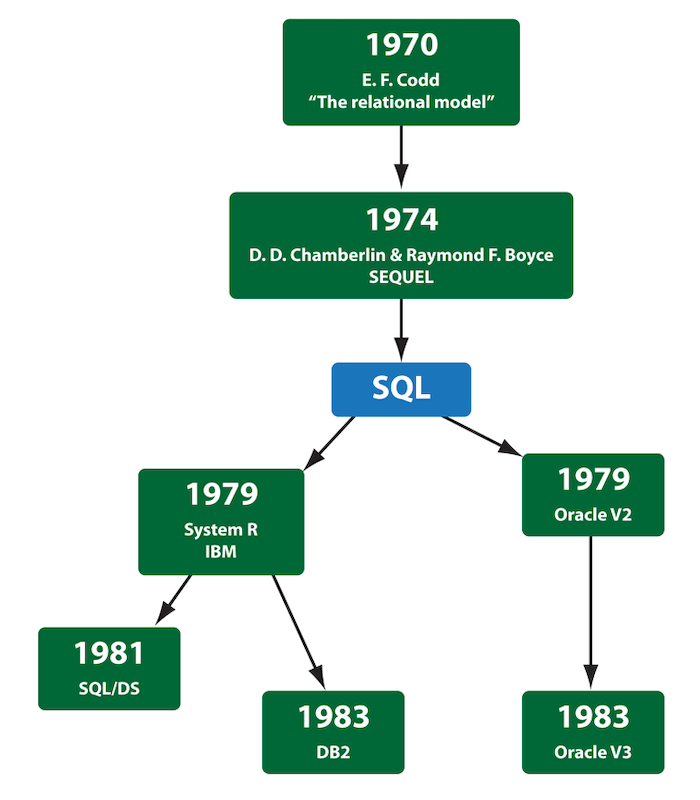
SQL was developed in the early 1970s at IBM by Donald D. Chamberlin and Raymond F. Boyce.
Originally called SEQUEL, or Structured English Query Language, it was designed to manipulate and retrieve data stored in IBM’s original quasi-relational database management system, System R. In 1979, Oracle released the first commercial implementation of SQL.
Today, SQL is essential across various relational database management systems like MySQL, PostgreSQL, Microsoft SQL Server, and Google BigQuery. However, with the advent of big data, NoSQL databases like MongoDB and Cassandra have gained traction, offering scalability and flexibility.

Despite this, SQL remains crucial for data professionals due to its standardized querying and manipulation capabilities across relational and non-relational databases.
SQL operates on relational databases, which store data in tables composed of rows and columns. Columns represent the different attributes or fields of the data, while rows represent individual records.
A relational database is a type of database that stores data in tables that can be related to each other. This relationship is established through keys, both primary and foreign.
A primary key is a unique identifier for each record in a table. For example, in an ’employees’ table, the ’employee_id’ could be the primary key, ensuring each employee is uniquely identifiable.
A foreign key is a field in one table that uniquely identifies a row of another table. It creates a link between the two tables. For example, an ‘orders’ table might have a ‘customer_id’ that serves as a foreign key linking to the ‘customers’ table’s primary key.
This relational structure allows us to efficiently organize, retrieve, and manage large amounts of data across different tables. Now that we have a basic understanding of tables, rows, columns, and what relational databases are, let’s write a simple SQL query.
-- This is all SQL really is: a structured question.
SELECT first_name, email
FROM users
WHERE country = 'United Kingdom';One of the first confusing things beginners encounter is that SQL isn’t just one language—it has multiple dialects.
Think of SQL dialects like regional accents or localized slang. The core foundation (ANSI SQL) is identical everywhere, but different database systems add their own custom features, performance tweaks, and syntactic quirks.
| Dialect | Where You’ll See It | Best For… |
|---|---|---|
| PostgreSQL | Tech startups, open-source projects, web backend services | The gold standard for modern application development and analytics. |
| MySQL / MariaDB | WordPress sites, legacy web apps, e-commerce stores | Powering a massive portion of the traditional web. |
| SQLite | Mobile apps, local testing, embedded software | Storing data in a single file without needing a server running. |
| Google BigQuery / Snowflake | Enterprise analytics, data warehouses, BI teams | Querying massive datasets (terabytes to petabytes) in seconds. |
| Microsoft SQL Server (T-SQL) | Corporate IT, financial institutions, enterprise healthcare | Heavy enterprise environments built around Microsoft infrastructure. |
Which flavor should you learn first?
It doesn’t matter. Standard syntax like SELECT, FROM, WHERE, GROUP BY, and JOIN works almost identically across 95% of database engines. Pick one, master the fundamentals, and switching later will take less than an hour.
Learning SQL isn’t just about syntax; it’s about learning how not to break things or waste compute power. Now, you may not understand what each of these concepts below mean, but you should know that keep in your mind that with SQL, you do have the power to shoot yourself in the foot.
The Dangerous UPDATE / DELETE: Running a modification query without a WHERE clause modifies or wipes every single row in the table.
The SELECT * Habit: Pulling every column from a multi-billion-row table will slow down your database and (if you’re using cloud warehouses like BigQuery) cost you real money.
The NULL Trap: NULL in SQL doesn’t mean zero or empty text—it means unknown. Treating NULL like regular values leads to unexpected query results.
Without further ado… Here’s the course content!